

PharmaAI – Smart Pharmacy Management & AI Prescription Assistant

1. Executive Overview: PharmaAI Smart Pharmacy Management & AI Prescription Assistant
The PharmaAI Smart Pharmacy Management & AI Prescription Assistant is a modern healthcare and pharmaceutical technology platform designed to streamline pharmacy operations through centralized medicine management, inventory control, billing and POS, customer management, supplier management, purchase orders, prescription analysis, notifications, and business analytics.
Pharmacies manage a continuous flow of medicines, customers, prescriptions, suppliers, purchase orders, stock movements, expiry dates, and daily transactions. PharmaAI brings these operational workflows together into a unified digital pharmacy management ecosystem, helping pharmacy teams reduce manual administration and gain better visibility into day-to-day operations.
The platform combines conventional pharmacy management capabilities with an AI-assisted prescription analysis workflow, enabling authorized pharmacy staff to upload prescription documents, extract medicine-related information, review the extracted details, and save verified prescription records.
PharmaAI is designed for retail pharmacies, independent medical stores, multi-branch pharmacy businesses, pharmacy chains, healthcare retailers, and pharmaceutical distribution operations that require a centralized and scalable digital platform.
The system is intended as an operational and information-management solution. AI-generated prescription information should be reviewed and verified by qualified professionals and does not replace a physician, pharmacist, or other licensed healthcare professional.
2. Multi-User Architecture: Pharmacy Staff, Managers & Administrators
PharmaAI is designed around a multi-user pharmacy architecture that allows different members of a pharmacy organization to access functionality according to their responsibilities.
A role-based approach helps separate daily pharmacy operations from administrative configuration and management activities.
- Pharmacist Portal: Provides access to prescriptions, medicines, customers, inventory, billing, orders, suppliers, and pharmacy workflows.
- Pharmacy Manager Portal: Provides access to operational dashboards, inventory monitoring, purchasing, reports, and business analytics.
- Administrator Portal: Provides centralized management of users, branches, medicines, suppliers, categories, settings, and system configuration.
- Multi-Branch Support: Allows organizations to manage multiple pharmacy branches from a centralized architecture.
- Branch Selection: Enables authorized users to work within their assigned pharmacy branch.
- Role-Based Permissions: Controls access to specific modules and actions based on the user's assigned role.
- User Activity Management: Can maintain operational records of important user activities and administrative actions.
This architecture provides a foundation for growing from a single pharmacy into a multi-location pharmaceutical management ecosystem.
3. Core Workspace & Pharmacy Dashboard
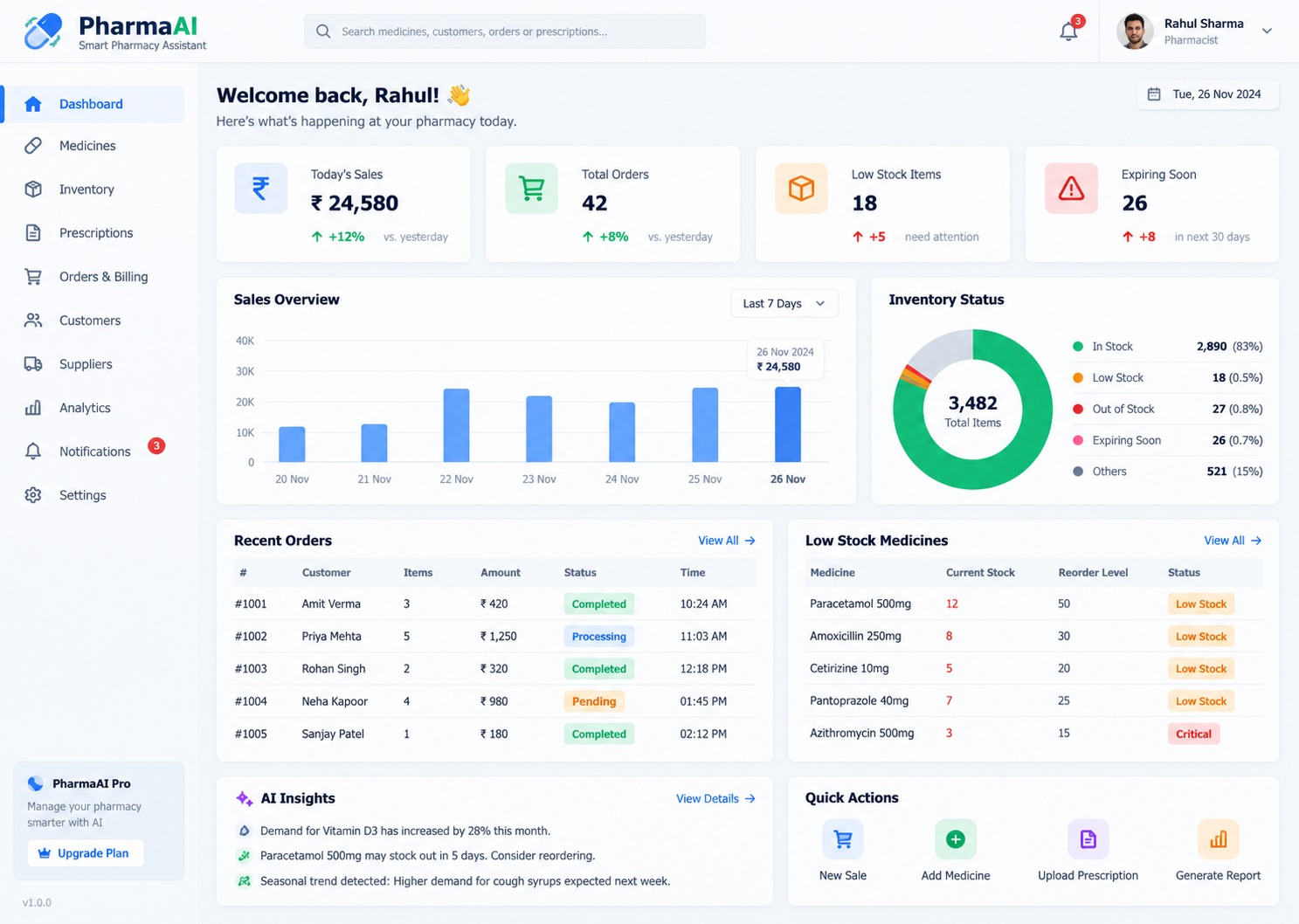
The PharmaAI Dashboard provides pharmacy staff with a centralized overview of important operational metrics and activities.
The dashboard is designed to provide immediate visibility into sales, orders, stock levels, expiring medicines, recent transactions, and AI-assisted operational insights.
- Today's Sales: Displays the current day's sales value and comparison indicators.
- Total Orders: Provides an overview of orders processed within the pharmacy.
- Low Stock Items: Highlights medicines that have reached configured stock thresholds.
- Expiring Medicines: Identifies inventory items approaching their configured expiry period.
- Sales Overview: Visualizes sales activity across selected time periods.
- Inventory Status: Provides a visual breakdown of in-stock, low-stock, out-of-stock, and expiring items.
- Recent Orders: Displays recently processed customer transactions.
- Low Stock Medicines: Provides a focused list of medicines requiring inventory attention.
- AI Insights: Presents analytical observations based on available pharmacy data.
- Quick Actions: Provides shortcuts for common tasks such as creating sales, adding medicines, uploading prescriptions, and generating reports.
The dashboard acts as the primary operational workspace for pharmacy teams.
4. Advanced Search, Filtering & Pharmacy Data Navigation
PharmaAI includes a centralized search and filtering experience that enables pharmacy staff to quickly locate medicines, customers, suppliers, orders, invoices, and prescriptions.
- Global Search: Allows users to search across supported pharmacy records.
- Medicine Search: Finds medicines using names, brands, categories, or other configured identifiers.
- Customer Search: Searches customer records using name, phone number, or email.
- Batch Search: Enables pharmacy staff to locate medicines using batch numbers.
- Supplier Search: Helps users locate suppliers and associated purchase records.
- Prescription Search: Provides access to stored prescription records.
- Order Search: Allows users to locate transactions and orders using supported identifiers.
- Category Filtering: Filters medicines according to configured pharmaceutical categories.
- Status Filtering: Enables filtering by inventory, customer, supplier, or order status.
- Date Filtering: Allows records to be filtered according to selected date ranges.
- Clear Filters: Provides a quick way to reset active search and filtering criteria.
The search architecture helps pharmacy staff retrieve operational information without navigating through multiple disconnected systems.
5. Medicine Catalog, Batch Management & Product Records
The Medicine Management Module provides centralized control over the pharmacy's medicine catalog.
Each medicine can contain structured information such as product name, brand, category, batch number, expiry date, stock quantity, MRP, and purchase price.
- Medicine Catalog: Maintains a centralized database of pharmacy products.
- Medicine Name: Stores the standardized name of each medicine.
- Brand Management: Associates medicines with their respective brands or manufacturers.
- Category Management: Organizes medicines into configurable pharmaceutical categories.
- Batch Management: Tracks individual medicine batches for operational inventory management.
- Expiry Date Tracking: Records expiry information for each batch.
- Stock Quantity: Maintains current available inventory.
- MRP Management: Stores configured maximum retail price information.
- Purchase Price: Records procurement cost for inventory analysis.
- Medicine Status: Indicates whether products are available, low in stock, expiring, or out of stock.
- Product Images: Supports medicine imagery for easier identification.
- Bulk Import: Can support importing medicine and inventory records through structured files.
Structured medicine records provide the foundation for inventory, sales, purchase, and reporting workflows.
6. Inventory Workflow, Stock Levels & Expiry Management
The Inventory Management Engine provides pharmacy teams with centralized visibility into stock quantities, low-stock products, expiring batches, and overall inventory value.
Inventory status can be monitored continuously to help pharmacy teams identify products requiring operational attention.
- Real-Time Stock View: Displays the current recorded quantity for supported medicines.
- Low Stock Detection: Identifies products below configured reorder thresholds.
- Out-of-Stock Tracking: Separates medicines with zero available inventory.
- Expiry Monitoring: Highlights medicines approaching their configured expiry date.
- Batch-Level Inventory: Tracks stock at the batch level where required.
- Inventory Valuation: Calculates inventory value using configured purchase or valuation data.
- Stock Import: Supports bulk inventory updates through structured import workflows.
- Stock Export: Enables inventory information to be exported for reporting and operational use.
- Stock Alerts: Provides notifications for configured inventory conditions.
- Inventory History: Can maintain records of stock additions, reductions, adjustments, and transfers.
- Category Management: Allows pharmacy administrators to organize inventory into relevant categories.
The inventory module provides a structured foundation for pharmacy stock control and replenishment planning.
7. AI Prescription Analysis & Verification Workflow
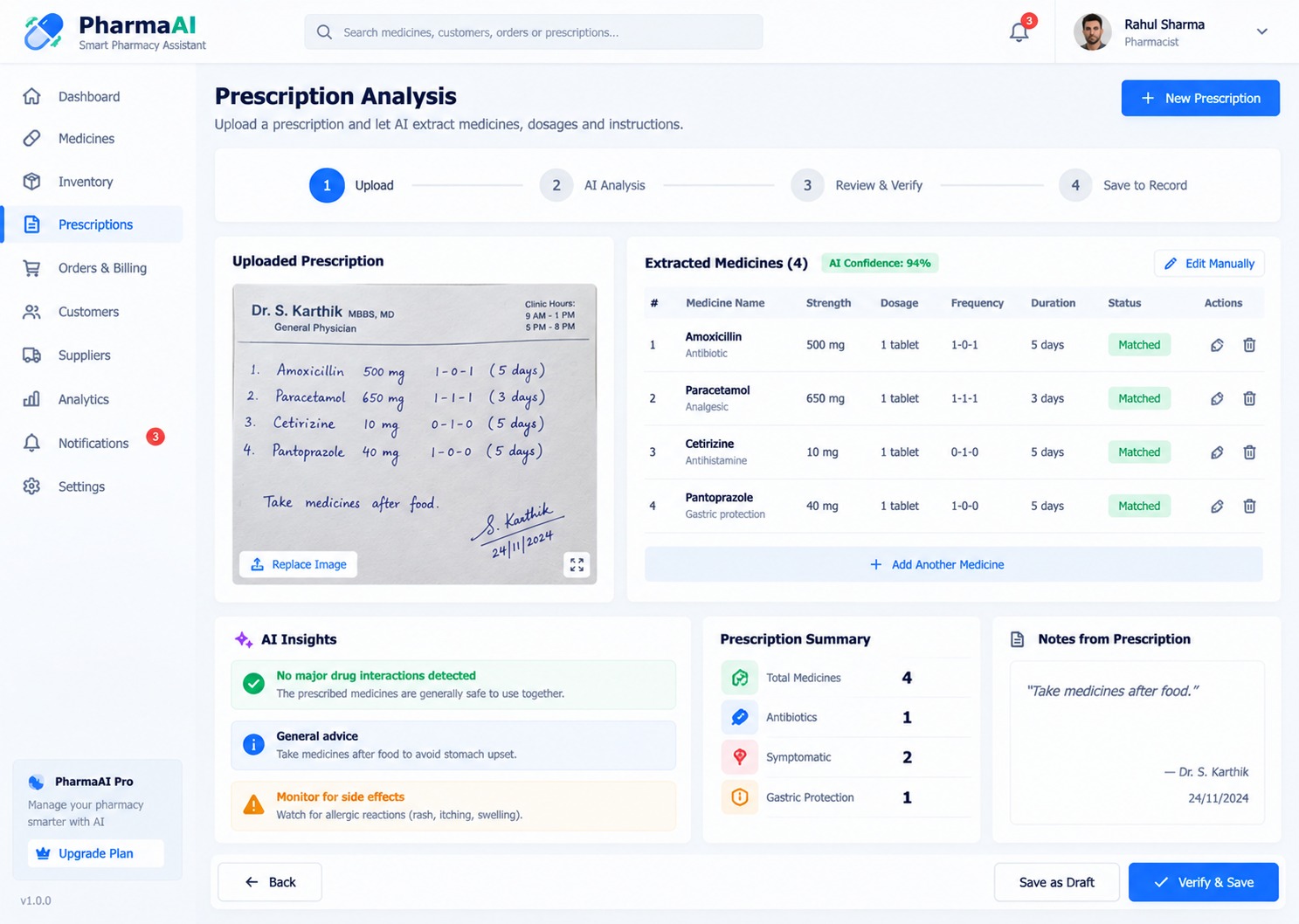
The AI Prescription Analysis Module introduces an AI-assisted workflow for extracting structured medicine information from uploaded prescription documents.
The workflow is designed around four stages: Upload, AI Analysis, Review & Verify, and Save to Record.
- Prescription Upload: Allows authorized users to upload a prescription image or supported document.
- AI Document Analysis: Processes the uploaded prescription to identify potentially relevant medicine information.
- Medicine Extraction: Attempts to extract medicine names and associated prescription details.
- Dosage Extraction: Can identify dosage information when it is clearly available in the source document.
- Frequency Extraction: Can identify instructions such as frequency where supported by the source.
- Duration Extraction: Can extract prescription duration information when available.
- Medicine Matching: Attempts to associate extracted medicines with records in the pharmacy catalog.
- AI Confidence Indicator: Displays an analytical confidence indicator where supported by the AI processing workflow.
- Manual Editing: Allows pharmacy staff to correct or modify extracted information.
- Review & Verification: Requires human review before information is saved as a finalized record.
- Prescription Notes: Preserves relevant notes extracted from or entered against the prescription.
- Save to Record: Stores verified prescription information for future reference.
AI extraction should be treated as an assistive technology, not an autonomous medical decision-maker. Prescription information must be checked against the original document and appropriate professional guidance before being acted upon.
8. Billing, POS, Orders & Pharmacy Transaction Processing
PharmaAI provides a structured Billing & Point-of-Sale (POS) workflow for managing pharmacy transactions.
The transaction engine can connect customer records, medicines, inventory, pricing, payment methods, and order information into a unified sales workflow.
- New Sale: Enables pharmacy staff to create a customer transaction.
- Medicine Selection: Allows products to be added directly from the medicine catalog.
- Quantity Management: Supports adjustment of quantities during checkout.
- Price Calculation: Calculates transaction values based on configured product pricing.
- Customer Association: Links transactions to existing customer records when applicable.
- Payment Processing: Supports configured payment methods such as cash, card, UPI, or integrated payment services.
- Order Status: Tracks supported transaction states.
- Invoice Generation: Can generate transaction invoices and receipts.
- Stock Deduction: Updates recorded inventory following completed transactions.
- Transaction History: Maintains previous sales for reporting and customer reference.
- Refund & Adjustment Workflow: Can support controlled transaction adjustments according to business rules.
The POS architecture connects front-counter sales with inventory and reporting to maintain consistent operational records.
9. Customer & Patient Management
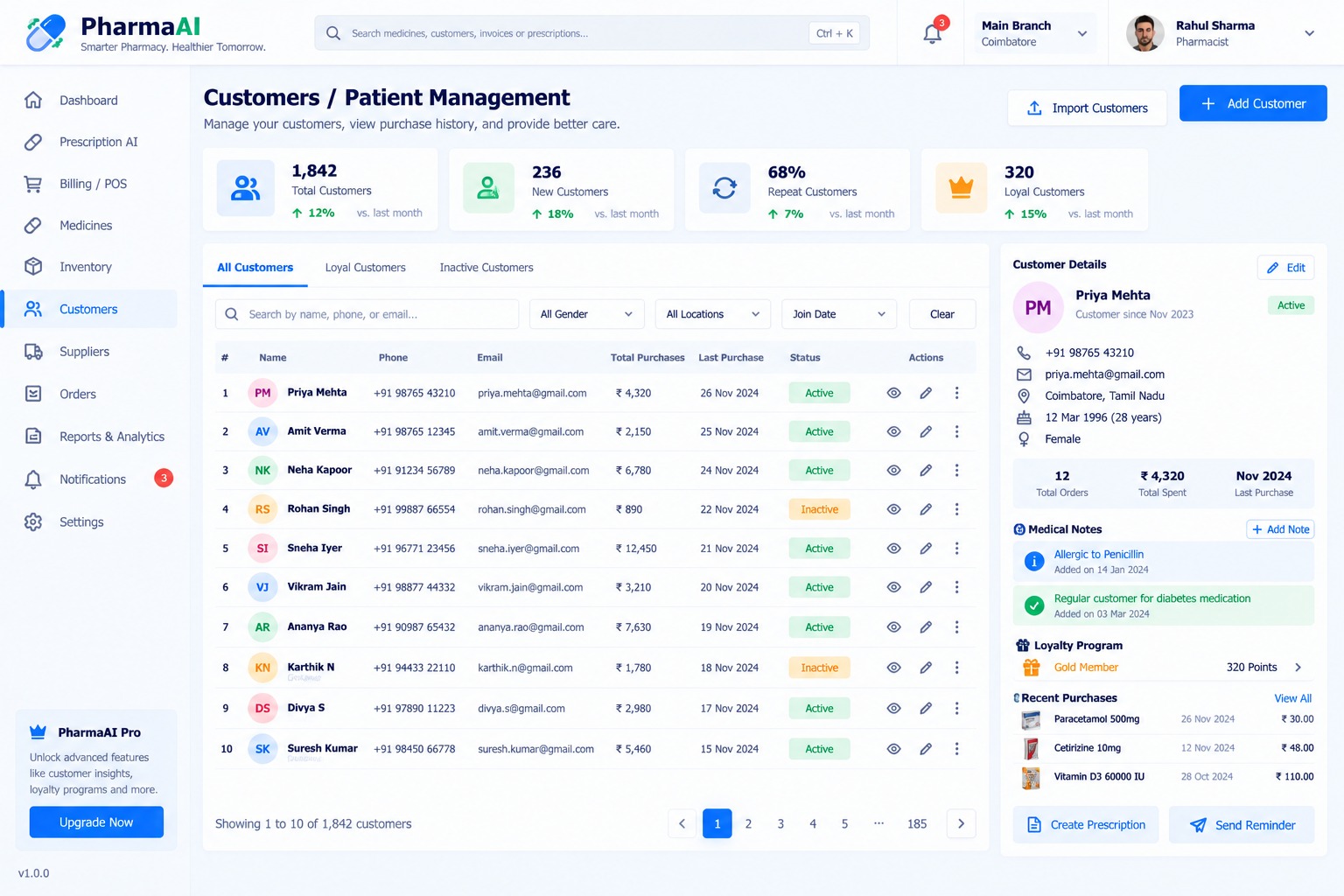
The Customer Management Module provides pharmacy teams with a centralized view of customer profiles, purchase history, contact information, and relevant pharmacy records.
The module is designed to help pharmacies provide more organized customer service while maintaining structured transaction records.
- Customer Profiles: Maintains customer contact and account information.
- Contact Information: Stores supported phone, email, and address information.
- Purchase History: Displays previous pharmacy transactions associated with the customer.
- Order History: Provides access to customer order records.
- Customer Status: Allows customers to be categorized using configurable status values.
- Customer Search: Enables rapid retrieval using name, phone, or email.
- Customer Segmentation: Can organize customers into supported categories such as loyal or inactive.
- Customer Notes: Allows authorized staff to maintain appropriate operational notes.
- Recent Purchases: Provides quick access to recently purchased medicines.
- Prescription Association: Can associate verified prescription records with the appropriate customer account.
- Customer Import: Supports structured customer-data import where required.
Because pharmacy customer records can contain sensitive information, access should be restricted to authorized personnel and managed according to applicable privacy and healthcare requirements.
10. Supplier Management, Purchase Orders & Procurement
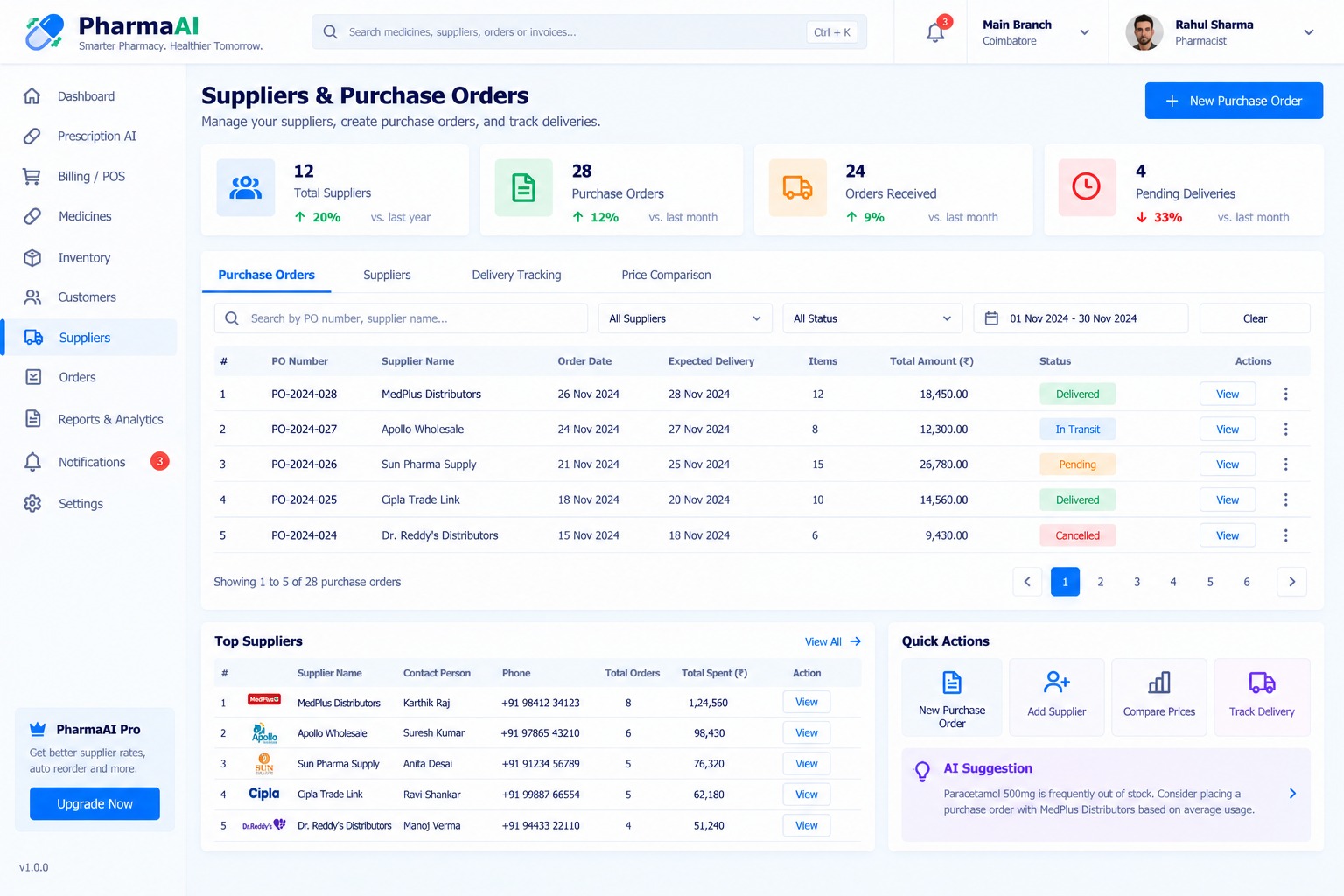
The Supplier & Purchase Order Module helps pharmacy businesses manage pharmaceutical suppliers and organize procurement workflows.
The module connects suppliers, medicines, purchase orders, delivery tracking, pricing, and inventory replenishment.
- Supplier Directory: Maintains supplier and distributor records.
- Supplier Contact Management: Stores supported supplier contact information.
- Purchase Orders: Allows authorized users to create and manage purchase orders.
- Purchase Order Status: Tracks orders through configurable states such as pending, in transit, delivered, or cancelled.
- Expected Delivery: Records expected delivery dates.
- Purchase Items: Maintains medicine quantities and pricing within purchase orders.
- Supplier Price Comparison: Allows users to compare available supplier pricing.
- Delivery Tracking: Provides visibility into purchase order delivery status.
- Purchase History: Maintains previous procurement transactions.
- Top Supplier Analysis: Can identify suppliers based on configured operational metrics.
- Reorder Workflow: Can support purchase recommendations based on stock thresholds and historical usage.
- AI Procurement Suggestions: Can surface analytical recommendations from available inventory and purchasing data.
The procurement module helps connect inventory requirements with supplier operations and purchasing workflows.
11. Financial Engine, Payments & Transaction Management
The Financial & Transaction Management Layer provides structured records for pharmacy sales, purchases, payments, invoices, and profitability analysis.
- Sales Tracking: Records completed pharmacy sales.
- Purchase Tracking: Maintains supplier purchase transactions.
- Payment Modes: Supports configurable payment methods such as cash, card, and UPI.
- Invoice Records: Maintains transaction invoice information.
- Revenue Calculation: Aggregates sales data for reporting.
- Purchase Cost Tracking: Records procurement costs associated with medicines.
- Profit Analysis: Calculates configured sales-versus-cost metrics.
- Transaction Status: Tracks payment and transaction completion states.
- Date-Based Financial Reports: Allows financial information to be analyzed across selected periods.
- Exportable Financial Data: Can support exporting transaction information for accounting workflows.
Financial calculations depend on the accuracy of configured pricing, purchasing, transaction, tax, and adjustment data.
12. Analytics Dashboard & Pharmacy Performance Reporting
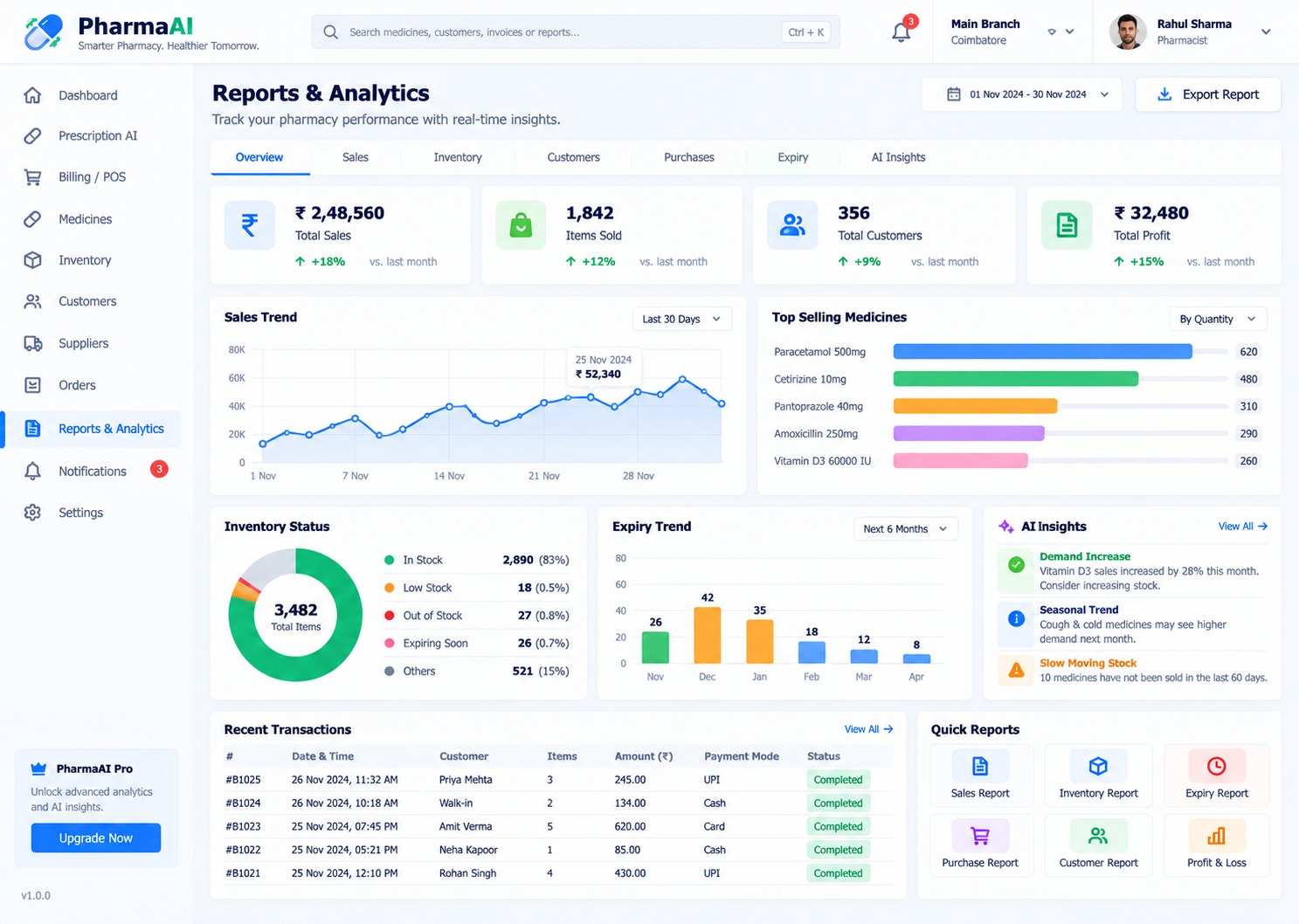
The Reports & Analytics Module transforms operational pharmacy data into visual dashboards and structured reports.
The analytics workspace can provide management with visibility across sales, inventory, customers, purchases, expiry, and AI-assisted insights.
- Sales Analytics: Visualizes sales performance across selected periods.
- Inventory Analytics: Provides an overview of inventory conditions and stock distribution.
- Customer Analytics: Displays customer activity and purchasing patterns.
- Purchase Analytics: Provides visibility into supplier purchases and procurement activity.
- Expiry Analytics: Tracks upcoming medicine expiry activity.
- Top-Selling Medicines: Identifies products with higher recorded sales quantities.
- Sales Trend Chart: Displays sales movement across selected time periods.
- Inventory Distribution: Visualizes stock categories such as in-stock, low-stock, and out-of-stock.
- Profit & Loss Reporting: Provides configured revenue, cost, and profit analysis.
- Recent Transactions: Displays recent pharmacy transactions.
- AI Insights: Presents analytical observations derived from available operational data.
- Report Export: Allows supported reports to be exported for management and business use.
13. Ratings, Reviews & Customer Feedback
PharmaAI can incorporate customer feedback functionality to help pharmacy businesses understand customer experiences and service quality.
- Customer Ratings: Allows customers to provide ratings through supported interfaces.
- Written Reviews: Enables customers to submit feedback.
- Service Feedback: Can collect feedback regarding pharmacy service experiences.
- Product Feedback: Can support feedback associated with eligible products where applicable.
- Review Moderation: Allows authorized administrators to review submitted feedback.
- Feedback Status: Provides configurable moderation and publication states.
- Customer History: Can associate feedback with customer accounts where appropriate.
- Feedback Analytics: Can summarize customer feedback for management reporting.
Any healthcare-related feedback should be handled carefully and should not be interpreted as a substitute for professional medical advice.
14. Saved Records, Favorites & Personalized Pharmacy Lists
The personalization layer allows pharmacy staff to maintain frequently accessed information and organize important operational records.
- Favorite Medicines: Allows frequently used medicines to be quickly accessed.
- Favorite Suppliers: Provides shortcuts to regularly used suppliers.
- Saved Customers: Enables quick access to frequently managed customer records.
- Recent Records: Provides access to recently viewed or processed information.
- Tracked Medicines: Allows important products to be monitored for stock or expiry conditions.
- Personalized Dashboard: Displays relevant operational information according to user activity.
- Quick Actions: Provides shortcuts for frequently performed pharmacy operations.
These features help reduce repetitive navigation and improve the usability of daily pharmacy workflows.
15. Omnichannel Notification Engine: In-App, Email & SMS
The PharmaAI Notification Engine can deliver operational alerts related to inventory, prescriptions, orders, customers, and other configured events.
- Low Stock Alerts: Notifies authorized staff when medicines reach configured stock thresholds.
- Expiry Alerts: Highlights medicines approaching their configured expiry dates.
- Order Notifications: Provides updates for relevant order and procurement events.
- Prescription Notifications: Can notify staff when prescription processing requires attention.
- In-App Notifications: Displays alerts directly within the application.
- Email Notifications: Supports email communication through an integrated email provider.
- SMS Notifications: Can support SMS alerts through a compatible messaging service.
- Push Notifications: Can support browser or mobile push notifications.
- Notification Preferences: Allows configurable notification behavior.
- Notification History: Maintains a record of generated alerts where supported.
Notification workflows should be configured carefully when they involve sensitive customer or prescription information.
16. Subscription Plans & PharmaAI Pro Monetization
PharmaAI can support a tiered subscription architecture for organizations that want to commercialize the platform as a SaaS or managed pharmacy technology service.
- Free Plan: Can provide access to selected pharmacy management functionality.
- Professional Plan: Can provide additional inventory, reporting, customer, and operational features.
- PharmaAI Pro: Can unlock advanced analytics, AI-assisted features, inventory intelligence, and additional business functionality.
- Enterprise Plan: Can provide multi-branch functionality, advanced integrations, customized reporting, and organization-level capabilities.
- Feature-Based Access: Allows individual capabilities to be restricted according to subscription level.
- Subscription Management: Supports plan selection, upgrades, renewals, and cancellations.
- Payment Gateway Integration: Can connect paid subscriptions with supported payment providers.
- Usage Monitoring: Can track configurable limits or usage-based features.
- Plan Configuration: Allows administrators to define available plans and feature entitlements.
The actual commercial model can be configured according to the pharmacy software provider's business requirements.
17. Admin Control Panel & Pharmacy Governance
The Admin Control Panel provides centralized governance over pharmacy operations, system configuration, users, branches, catalog records, and business settings.
- User Management: Creates and manages authorized application users.
- Role Management: Defines access roles and permissions.
- Branch Management: Creates and manages pharmacy branches.
- Medicine Management: Controls the centralized medicine catalog.
- Category Management: Maintains configurable medicine categories.
- Supplier Management: Maintains supplier and distributor records.
- Inventory Controls: Provides administrative inventory configuration.
- Prescription Records: Allows authorized administrators to manage supported prescription records.
- Customer Management: Provides controlled access to customer records.
- Notification Management: Configures supported system notifications.
- Subscription Management: Controls SaaS plans and feature entitlements.
- System Settings: Centralizes application configuration.
- Audit Controls: Can maintain logs for important administrative activities.
The administrative layer enables pharmacy organizations to maintain consistent operational policies across their digital environment.
18. Search Engine Optimization (SEO) & Healthcare Metadata Architecture
The public-facing PharmaAI website and product pages can be structured using an SEO-friendly content architecture to improve discoverability for pharmacy software and healthcare technology searches.
- SEO-Friendly URLs: Uses readable URLs for product, feature, and informational pages.
- Dynamic Page Titles: Supports optimized titles for public-facing pages.
- Meta Descriptions: Provides structured descriptions for search engine results.
- Healthcare Software Keywords: Supports relevant terminology around pharmacy management and pharmaceutical technology.
- Feature Landing Pages: Allows individual modules such as inventory, POS, and prescription analysis to have dedicated pages.
- Structured Content: Organizes pharmacy software information into search-friendly sections.
- Open Graph Metadata: Supports optimized social sharing previews.
- Canonical URLs: Helps manage duplicate public URLs.
- Internal Linking: Connects related pharmacy management features and product information.
- Image Alt Text: Provides descriptive accessibility and search metadata for product screenshots.
SEO content should remain accurate and avoid unsupported medical, clinical, or treatment claims.
19. Security, RBAC & Healthcare Data Access Control
Security is a core component of a pharmacy management platform because the system may process customer information, prescription documents, transaction records, inventory data, and business information.
- Secure Authentication: Restricts application access to authenticated users.
- Role-Based Access Control: Limits functionality according to user roles.
- Branch-Level Permissions: Can restrict users to their assigned pharmacy branch.
- Protected Prescription Records: Limits prescription information to authorized users.
- Customer Data Protection: Restricts access to customer information according to configured permissions.
- API Authentication: Protects application programming interfaces from unauthorized access.
- Input Validation: Validates user-submitted information before processing.
- Session Management: Maintains controlled authenticated sessions.
- Audit Logging: Can record important administrative and operational activities.
- Data Backup Strategy: Can support scheduled database and document backups.
- Secure File Handling: Applies controlled handling of uploaded prescription documents and other files.
Deployment should be configured according to applicable healthcare privacy, pharmaceutical, cybersecurity, and data-protection requirements in the target jurisdiction.
20. Scalable Architecture, API Infrastructure & Integrations
PharmaAI can be implemented as a modular, API-driven architecture that separates the user interface, pharmacy business logic, database layer, AI services, notification infrastructure, and external integrations.
- RESTful API Layer: Provides structured APIs for medicines, customers, prescriptions, inventory, suppliers, orders, and reports.
- Modular Backend: Separates major pharmacy domains into maintainable business modules.
- AI Service Integration: Connects prescription document processing and other AI-assisted capabilities through dedicated services.
- Database Architecture: Provides structured storage for transactional pharmacy records.
- Payment Integration: Supports integration with suitable payment gateways.
- Email Integration: Connects transactional email services for supported notifications.
- SMS Integration: Supports compatible SMS providers.
- Cloud Storage: Can store prescription images, medicine images, reports, and other application assets.
- Reporting APIs: Provides structured data for dashboards and external reporting tools.
- Third-Party Integration: Can be extended to accounting, logistics, healthcare, ERP, and pharmaceutical data services.
- Multi-Branch Architecture: Supports centralized management across multiple pharmacy locations.
- Mobile Application Support: Provides a backend foundation that can support future Android and iOS applications.
The modular architecture allows additional pharmacy services and integrations to be introduced without redesigning the complete platform.
21. Versatile Industry Use Cases
PharmaAI can be adapted to multiple healthcare retail and pharmaceutical business environments.
- Independent Retail Pharmacies: Provides centralized medicine, inventory, billing, customer, and supplier management.
- Multi-Branch Pharmacies: Supports centralized management across multiple pharmacy locations.
- Pharmacy Chains: Provides a scalable operational platform for larger pharmacy networks.
- Hospital Pharmacies: Can be adapted for internal pharmacy inventory and transaction workflows.
- Clinic Pharmacies: Can support medicine and prescription-related operational workflows.
- Healthcare Retailers: Provides structured product, customer, inventory, and sales management.
- Pharmaceutical Distributors: Can be extended to procurement, inventory, supplier, and distribution workflows.
- FPO / Healthcare Networks: Can support centralized medicine and pharmacy information management where applicable.
- Digital Pharmacy Platforms: Provides a foundation for online pharmacy management systems.
- Pharmacy SaaS Providers: Can be commercialized as a configurable software-as-a-service platform.
22. Measurable Business Benefits & Operational Efficiency
PharmaAI is designed to centralize pharmacy operations and provide better visibility across the complete medicine management lifecycle.
- Centralized Operations: Brings medicines, customers, inventory, suppliers, orders, prescriptions, and reports into one platform.
- Improved Inventory Visibility: Makes stock, low-stock, out-of-stock, and expiry information easier to monitor.
- Faster Prescription Processing: AI-assisted extraction can reduce repetitive manual data entry when prescription documents are suitable for processing.
- Better Procurement Planning: Connects inventory conditions with supplier and purchase order workflows.
- Customer Visibility: Provides structured access to customer purchase history and associated records.
- Business Analytics: Converts operational data into dashboards and reports.
- Expiry Awareness: Helps pharmacy teams identify inventory approaching expiry.
- Operational Automation: Reduces repetitive administrative workflows through alerts and structured processes.
- Multi-Branch Scalability: Provides a foundation for managing multiple pharmacy locations.
- Data-Driven Management: Enables pharmacy managers to analyze sales, inventory, purchasing, and customer activity.
- Extensible Technology Foundation: Supports future integrations with AI, healthcare, accounting, payment, notification, and external business systems.
23. Conclusion: Digital Foundation for Smart Pharmacy Management
The PharmaAI Smart Pharmacy Management & AI Prescription Assistant provides a unified technology foundation for modern pharmacy operations, combining medicine management, inventory intelligence, billing and POS, customer management, supplier procurement, prescription analysis, notifications, and business analytics within a single digital platform.
From the first customer interaction to medicine selection, prescription verification, billing, inventory updates, supplier procurement, and management reporting, PharmaAI creates connected workflows across the pharmacy's operational environment.
Its combination of AI-assisted prescription processing, structured pharmacy inventory management, customer records, procurement workflows, analytical dashboards, role-based access control, and API-driven architecture makes the platform adaptable to independent pharmacies, multi-branch businesses, healthcare retailers, and pharmaceutical technology organizations.
The platform can be further extended with e-prescription workflows, pharmacy delivery management, accounting integrations, advanced demand forecasting, barcode and QR scanning, loyalty programs, mobile applications, supplier integrations, digital payments, and additional AI-assisted operational tools.
PharmaAI establishes a scalable digital foundation for organizations looking to modernize pharmacy operations while keeping human verification and professional oversight at the center of healthcare-related workflows.
- Deployment Cloud / On-Premise
- Tax Compliance GST & Global DDP
- Source Code Full IP Ownership
Product Visual Showcase


